

Most contractors know how much they invoiced over the year. Far fewer know which jobs actually made them money, and those who find out often learn it too late, once the job is finished and paid.
Two jobs of the same amount can leave completely different margins. Job profitability tracking is what lets you know which ones, while there's still time to act. Here's how it works, which costs to track, and the mistakes that skew the picture.
Why revenue doesn't tell you if you're making money
A big job isn't necessarily a good job. Revenue tells you what you billed, not what is left once the costs are paid.
Without job-by-job tracking, every cost blends together in your general books: your crew's hours, supplier invoices, fuel, the dumpster rental. At the end of the year, your financial statements tell you whether the business made money. They don't tell you which jobs carried the others.
That is why so many contractors keep taking, year after year, jobs that have them working for almost nothing.
The 5 costs to track on every job
1. Labor. The hardest cost to track, and almost always the one that runs over. You need each worker's actual hours on this job, not a weekly total. Use an hourly rate that includes your labor burden: the employer's share of Social Security and Medicare, unemployment taxes, workers' comp and benefits. Your accountant can give you the exact percentage.
2. Materials. Supplier invoices and hardware store runs, tied to the right job. The trap: receipts that stay in the truck and never get entered.
3. Subcontractors. The electrician, the plumber, the excavator. Record the agreed amount up front, not just when the invoice shows up.
4. Fuel and travel. Often forgotten, they add up fast on jobs far from the shop or that need several trips.
5. Other costs. Equipment rental, the dumpster, permits. Small one at a time, but they add up quickly.
The budget: your starting point
To know whether a job is running over, you need to know what it was supposed to cost. The simplest way to set that budget: start with your estimate price, then take out the margin you are aiming for.
For example, on a job sold for $12,000 before tax with a 20% target margin, your cost budget is $9,600. As long as your actual costs stay under that, you keep your margin. Then split that budget across the five categories, based on what you planned in the estimate.
Planned vs. actual: the heart of job costing
Job profit tracking means constantly comparing what you planned with what is actually happening, category by category. It lets you:
catch an overrun during the job, while you can still react;
protect your margin by adjusting the crew, the schedule or your orders;
bill change orders with numbers in hand, not by eye;
know which types of jobs really pay;
write better estimates, based on your real numbers.
A member of our team who used to run several exterior painting crews puts it this way: "You plan 20 hours for a job, it takes 25, 30." If nobody compares, that overrun goes unnoticed, job after job.

What an overrun costs when you catch it too late
A job sold for $12,000. To keep a 20% margin, it can't cost more than $9,600: that is your budget.
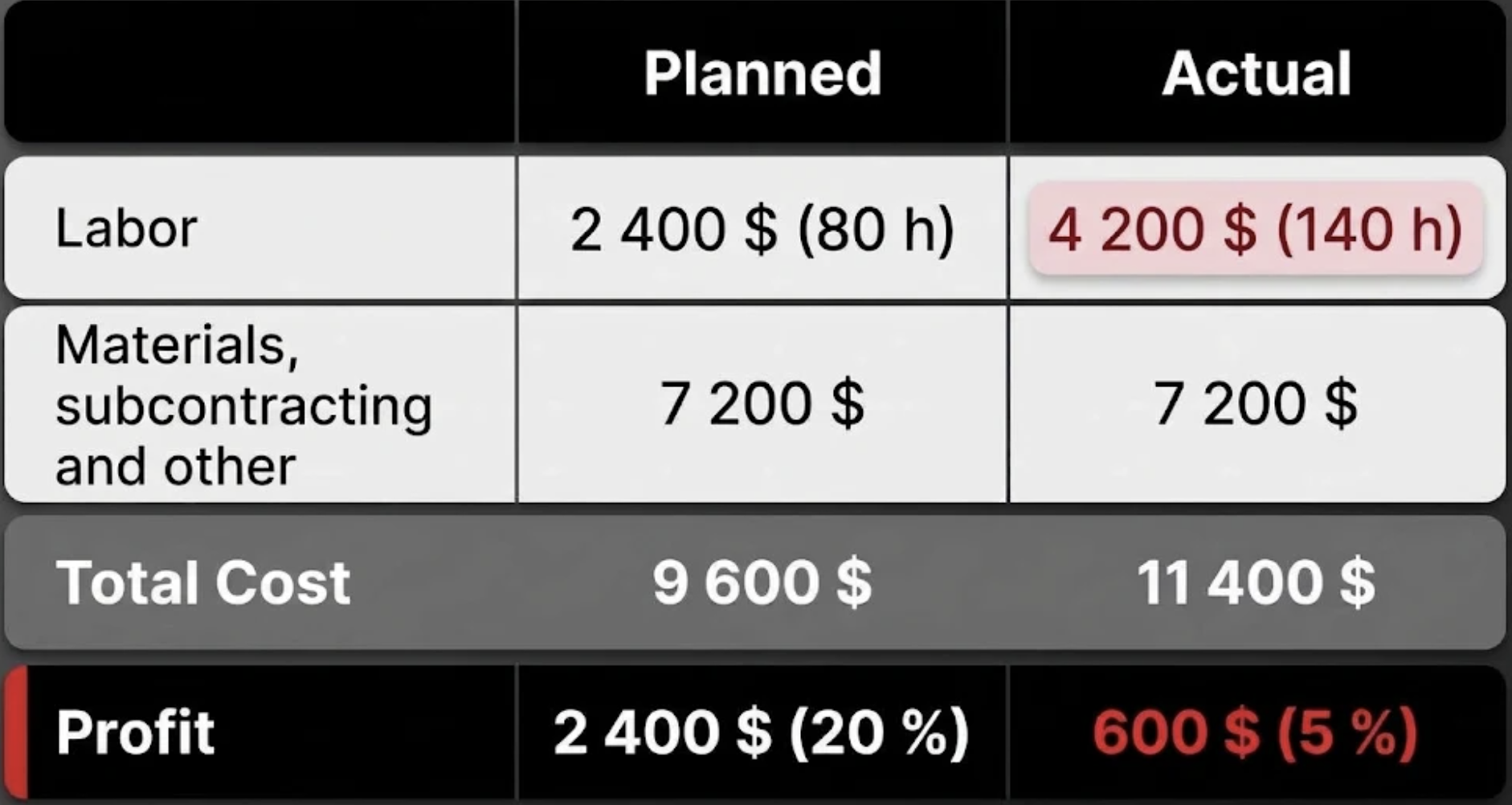
Everything came in as planned except labor: 60 extra hours at $30 an hour, so $1,800. The customer paid the same price. Your profit drops from $2,400 to $600.
If you had caught it halfway through, you would have seen that 70 of the 80 planned hours were already used, while the job wasn't even half done. The price agreed with the customer doesn't change, but you could still have acted:
Check for extra work. If the customer asked for work that wasn't in the estimate, get a signed change order before you do it, so you can bill for it.
Use your terms. If your estimate includes extra charges for conditions that couldn't be seen up front, like rotten sheathing found under the siding, tell the customer as soon as you find it, before doing the work.
Rethink the setup. Crew size, the order of the work, trips back to the supplier.
Found at invoicing time, the same gap is lost: it is too late to get a change order approved. All you can do is adjust your next estimate. That is also why your terms need to be spelled out in the estimate, before the customer signs.
The link with your estimates
The estimate sets the target. Tracking measures reality. And what you learn on one job goes into the next estimate.
If your roofs always run 15% over on labor, your production rate is too optimistic. If materials run over on one type of job, your quantities are off. Without tracking, you repeat the same mistakes in every estimate. With it, your prices adjust to the way you really work. That is also why it helps to keep estimates and tracking in one place: the plan is already there when the job starts.
By type of business
General contractors. A big share of costs goes through subs. Record the agreed amounts as soon as they are committed, not just when invoices arrive, or your actual cost looks low until the very end.
Specialty contractors (roofing, painting, siding, paving). Labor and materials make up almost all of the cost. Compare your margin by job type: you will often find one service pays a lot better than another.
Landscaping and maintenance. Keep recurring contracts, like lawn care or snow removal, separate from one-off projects. A weak maintenance season can hide behind a few big install jobs.
Common mistakes
Counting only invoices received. A purchase order placed or a sub hired is a cost, even if the invoice hasn't arrived yet.
Rounding hours. Fifteen minutes per worker per day, over a whole season, adds up to thousands of dollars. Hours need to be logged on site, by job.
Forgetting small costs. Fuel, the dumpster, return trips to the supplier. One at a time, they are nothing. Together, they are often the difference between a good job and a so-so one.
Waiting until the end of the job. At invoicing, it is too late to fix anything. Check your numbers at least once a week on active jobs.
Tracking everything in a separate spreadsheet. It works as long as someone remembers. Once the season gets busy, the spreadsheet falls behind, and nobody trusts it.
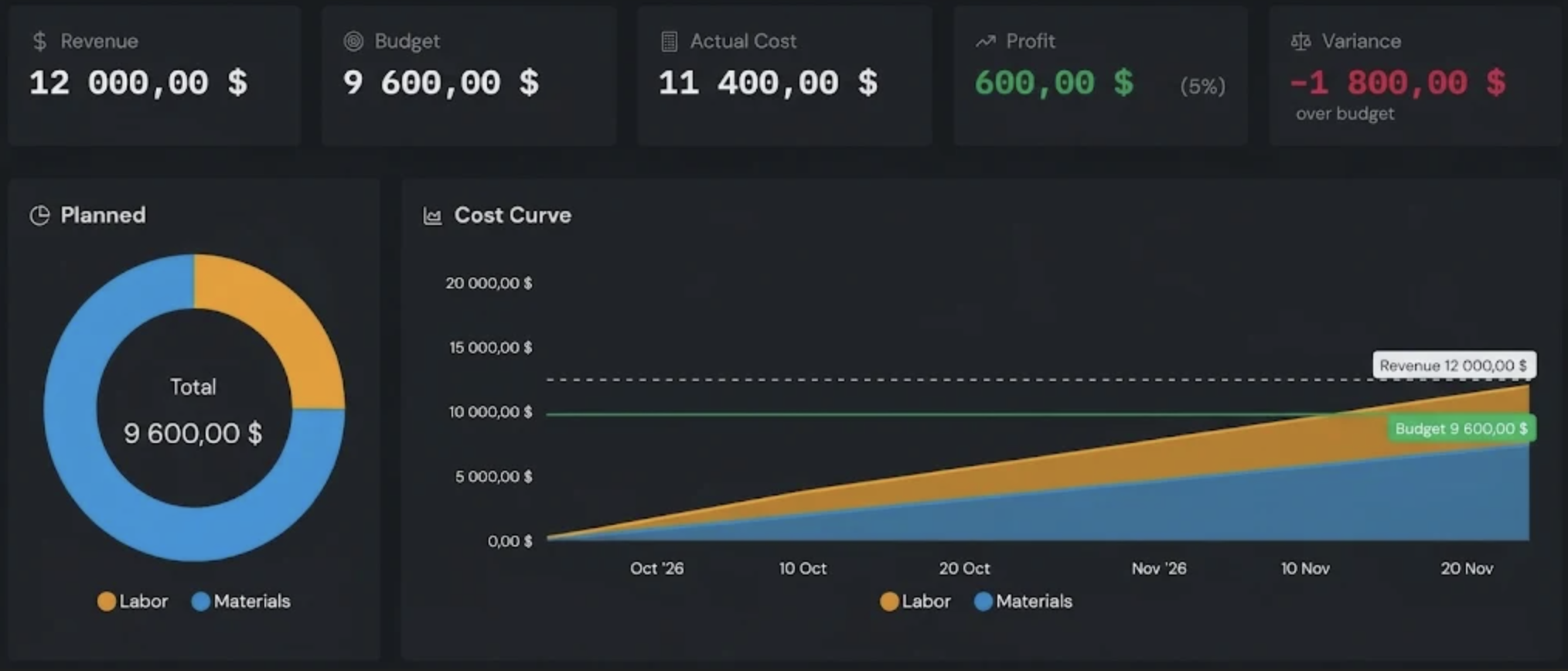
Job profit tracking in PlanOps
In PlanOps, every job has a Finances tab that updates as the work goes on:
The big picture at a glance: revenue, budget, actual cost, profit in dollars and as a percentage, and the variance against budget.
A budget plan by category: labor, materials, fuel, subcontractors and other, with planned, actual and variance. By default, the budget is the estimate price minus 20%, and you can enter your own amount.
Automatic labor costs: when your crew clocks in on the job, their hours are added to the actual cost. For each worker, you see planned time, logged time and actual pay.
Costs from a photo: scan a supplier invoice, and Chloé, the PlanOps AI assistant, adds it to the job's costs.
The cost curve: watch costs climb week by week, compared with revenue and budget.
You see the gap during the job, not three months later. For your accounting, invoices sync with QuickBooks.

The bottom line
Revenue doesn't tell you which jobs make you money. Job-by-job tracking does: a clear budget, five cost categories, and a regular comparison of planned vs. actual. The sooner you see the gap, the better your chances of protecting your margin, and the sharper your next estimates.
More than 370 businesses use PlanOps. During onboarding, our team sets up your services, hourly rates and price lists with you so your numbers are right from day one.
Frequently asked questions
What's the difference between the budget and the quote price?
The quote price is what the client pays. The budget is the most the job can cost you if you want to keep your target margin. For example, a job sold for $12,000 with a target margin of 20% has a budget of $9,600.
What's a good margin for a construction contractor?
It varies a lot depending on the trade, the size of the company and the type of clients. Rather than aiming for a number you found online, compare your jobs with each other and with your own previous years. Your accountant can also place you relative to your industry.
How often should I check the profitability of a job?
At least once a week during the job, and at the end of every job. On longer jobs, also look at each major milestone.
Do I need an accountant to do this tracking?
No. Job-by-job tracking means comparing hours and invoices to a budget. Your accountant is still useful for the real rate of your employer contributions, for the allocation of your overhead and for your financial statements.
How do I calculate the true cost of an hour of labour?
Start with the hourly wage, then add employer contributions (QPP, EI, QPIP, CNESST, HSF) and vacation pay. Your accountant can give you the exact percentage for your business.